Building WeatherWise: A Weather Platform That Tells You What to Do
Building a weather platform that transforms raw API data into prioritised, actionable recommendations, and the full-stack architecture that supports it.
David Shortland4 April 20267 min read
Every weather app shows you the same thing: temperature, humidity, wind speed, a little cloud icon. You look at the number, you decide what it means for your day, you close the app. The interpretation is your problem.
For the Advanced Web Development module at UEA I built WeatherWise. It does the interpretation for you. Instead of showing "UV index: 9" and leaving you to work out what that means, it tells you to wear SPF 50+, stay out of direct sun between 10 and 4, and bring a hat. Instead of "wind: 45 km/h" it tells you to secure outdoor furniture and drive carefully.
The project scored 95%, in a module that came out at 89% overall, and I think the reason is that the interesting engineering isn't in fetching weather data, which is an API call, but in what happens between the data arriving and the user seeing it.
The Insight Engine§
The core of the application is a rule-based recommendations system that evaluates raw weather data against a set of conditions and produces prioritised, actionable insights.
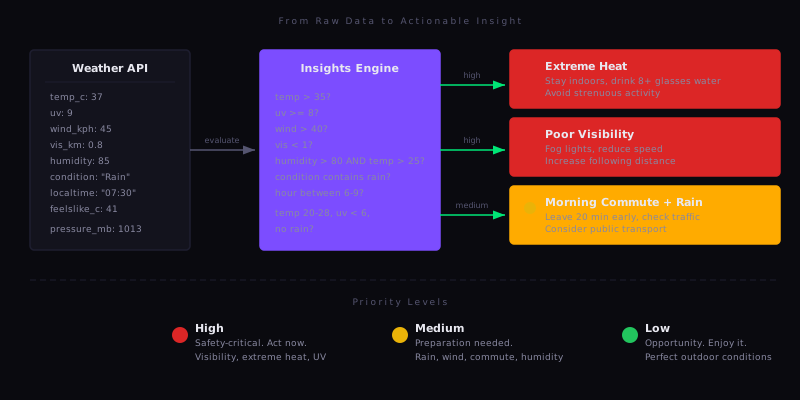
Each insight has a category (safety, health, travel, activity, clothing, business), a priority level, a description of the condition, and an action. The action is the specific thing the user should do.
The rules are layered by severity:
High priority covers safety-critical conditions. Visibility below 1 km triggers fog driving advice, temperature above 35 degrees triggers heat warnings with hydration targets, and UV index 8 or above triggers specific sunscreen SPF recommendations and time windows to avoid.
Medium priority covers preparation. Rain in the forecast triggers umbrella and waterproof advice, and the engine also checks the time of day, so rain between 6 and 9 AM adds a commute-specific recommendation to leave 20 minutes early, check traffic apps and consider public transport. High humidity combined with high temperature triggers hydration alerts that wouldn't fire for either condition alone.
Low priority captures opportunities. Temperature between 20 and 28 degrees with UV below 6 and no rain gets you a suggestion to go outside, and it only fires when none of the higher-priority conditions are active.
interface Insight {
  category: 'clothing' | 'activity' | 'travel' | 'health' | 'business' | 'safety';
  priority: 'high' | 'medium' | 'low';
  icon: React.ReactNode;
  title: string;
  description: string;
  action: string;
}
The insights are sorted by priority before rendering. High-priority items appear first with red indicators, medium items are amber, low items are green. If nothing triggers at all, the component shows a positive "all clear" message instead of an empty state.
What makes this more than a series of if-statements is that the rules compose. The commute recommendation checks for rain and a specific time window. The humidity alert checks humidity and temperature, because 85% humidity at 15 degrees isn't a health concern and 85% humidity at 30 degrees is. The rules encode domain knowledge about when weather conditions actually matter to a person's day.
The Stack§
This project uses a different stack from everything else in my portfolio, which was part of the point. The work projects and my other university work are Angular. WeatherWise is Next.js 15 with React 19, PostgreSQL with Drizzle ORM, and Zustand for state management.
Next.js gave me the App Router for file-based routing with server components, API routes co-located with the pages that use them, and middleware for authentication guards. Drizzle gave me type-safe database queries that infer their types from the schema definition, so the TypeScript compiler catches query errors at build time rather than at runtime. Zustand gave me a lightweight store without Redux's boilerplate.
Between them the type safety runs from the database schema through the API routes to the React components. Change the schema and the compiler errors appear everywhere that data is used.
Authentication: No Passwords§
WeatherWise uses Google OAuth exclusively. There's no registration form, no password field, no forgot-password flow. Users click "Continue with Google" and they're in.
This was a deliberate design decision rather than a shortcut. Password authentication means storing hashed passwords, building reset flows, handling rate limiting, dealing with weak passwords, and accepting liability for credential storage, and OAuth delegates all of it to Google. The database stores a user's name, email and profile image. No secrets.
The NextAuth callback chain handles user creation automatically:
async signIn({ user, account, profile }) {
    const existingUser = await db.select().from(users)
        .where(eq(users.email, user.email));

    if (existingUser.length === 0) {
        await db.insert(users).values({
            name: user.name,
            email: user.email,
            image: user.image,
            preferences: { temperatureUnit: 'celsius', windUnit: 'kmh' }
        });
    } else {
        await db.update(users)
            .set({ name: user.name, image: user.image, updatedAt: new Date() })
            .where(eq(users.email, user.email));
    }
    return true;
}
First sign-in creates the user with sensible defaults, and subsequent sign-ins update the profile image and name in case the user changed them on Google's side. The JWT session lasts 30 days. The schema took three migrations to reach this design: the first version had a password field, the second added OAuth, and the third removed passwords entirely.
State Management and Caching§
The Zustand store manages the weather data cache, user preferences, saved locations and loading state. The interesting part is how it handles multiple locations.
The dashboard loads weather for up to four saved locations in parallel:
const weatherPromises = locations.map(async (location) => ({
    locationId: location.id,
    weather: await fetch(`/api/weather/current?location=${lat},${lon}`).then(r => r.json())
}));

const results = await Promise.all(weatherPromises);
Each result is stored in a locationWeatherCache object keyed by location ID, and when the user removes a location its cached weather is pruned with it:
removeLocation: (locationId) => set((state) => ({
    locations: state.locations.filter(loc => loc.id !== locationId),
    locationWeatherCache: Object.fromEntries(
        Object.entries(state.locationWeatherCache)
            .filter(([key]) => key !== locationId)
    )
}));
The store also handles unit conversion. Converting at the component level would scatter the conversion logic across the codebase, so the store provides helper methods instead:
getTemperatureInUnit: (tempC, tempF) => {
    return get().preferences.temperatureUnit === 'celsius' ? tempC : tempF;
}
Components call the helper, so the preference propagates from one place. Add a Kelvin option tomorrow and only the store changes.
Location Comparison§
The comparison feature lets users place up to four saved locations side by side. Each location loads its weather in parallel and the UI highlights the best and worst values for each metric.
The highlighting logic is context-aware. For temperature, higher isn't necessarily better or worse, so it's left neutral. For UV and wind, lower is better. For visibility, higher is better. The system determines best and worst per metric, and it only applies colour highlighting when three or more locations are being compared, since with two it's obvious.
This feature reuses the same weather API calls and Zustand cache as the dashboard, so a location that was already loaded on the dashboard doesn't get fetched again. The comparison just reads from the store.
Geolocation and Fallbacks§
When the dashboard loads it requests the browser's geolocation with a 5-second timeout:
navigator.geolocation.getCurrentPosition(
    (position) => {
        const { latitude, longitude } = position.coords;
        if (savedLocations.length === 0) {
            loadWeatherForLocation(latitude, longitude);
        }
    },
    (error) => {
        if (savedLocations.length === 0) {
            loadWeatherForLocation(51.5074, -0.1278); // London fallback
        }
    },
    { enableHighAccuracy: false, timeout: 5000, maximumAge: 0 }
);
The fallback strategy has two layers. If the user has saved locations, those take priority over geolocation entirely, because the user has already told the system what they care about. If they have no saved locations and geolocation fails, whether through denied permissions or a timeout or unavailability, it falls back to London. The user always sees weather data and never an empty screen.
Locations are stored and queried by latitude and longitude, not by city name. "Portland" could be Oregon or Maine. Coordinates avoid the ambiguity and give precise results from the weather API.
The Data Model§
The database has two tables. Users store authentication data and preferences as a JSON column:
export const users = pgTable('users', {
    id: uuid('id').defaultRandom().primaryKey(),
    name: varchar('name', { length: 255 }),
    email: varchar('email', { length: 255 }).unique().notNull(),
    image: text('image'),
    preferences: json('preferences').$type<{
        temperatureUnit: 'celsius' | 'fahrenheit';
        windUnit: 'mph' | 'kmh';
    }>().default({ temperatureUnit: 'celsius', windUnit: 'kmh' }),
    createdAt: timestamp('created_at').defaultNow(),
    updatedAt: timestamp('updated_at').defaultNow()
});
Locations use decimal precision to seven places, which is roughly 1 centimetre of accuracy, and cascade-delete with their user:
export const locations = pgTable('locations', {
    id: uuid('id').defaultRandom().primaryKey(),
    userId: uuid('user_id').references(() => users.id, { onDelete: 'cascade' }).notNull(),
    name: varchar('name', { length: 255 }).notNull(),
    latitude: numeric('latitude', { precision: 10, scale: 7 }).notNull(),
    longitude: numeric('longitude', { precision: 10, scale: 7 }).notNull(),
    isDefault: boolean('is_default').default(false),
    createdAt: timestamp('created_at').defaultNow()
});
Preferences live in a JSON column rather than in separate columns because they're always read and written as a unit, so adding a new preference like a pressure unit means updating the TypeScript type and the default value, with no migration needed.
API inputs are validated with Zod schemas at the route boundary. The preferences endpoint rejects anything that isn't a valid unit combination:
const preferencesSchema = z.object({
    temperatureUnit: z.enum(['celsius', 'fahrenheit']),
    windUnit: z.enum(['mph', 'kmh'])
});
Invalid input gets a 400 before it reaches the database, and valid input is type-safe from that point forward.
The weather data itself is free. WeatherAPI.com gives you temperature, wind, UV, humidity, visibility, pressure, forecasts and alerts, and any developer can display that in a grid.
The value is in the layer between the data and the user. The insight engine is only about 200 lines of code. It encodes the domain knowledge that most weather apps leave to the user: what UV 9 means for your skin, what 0.8 km visibility means for your drive, what rain at 7 AM means for your commute.