Building a Portfolio That Practices What It Preaches
How I deployed an Angular 21 SSR app on AWS Lambda, and why every architectural decision was really a statement about how I think software should be built.
Most developer portfolios are static sites. There's nothing wrong with that. If all you need is a page that says "here's my work," a static site does the job. But I wanted this site to be the work itself. Every decision in the stack is deliberate, and together they reflect how I think about building software.
This post isn't really a deployment guide. It's about the principles behind the decisions, and a particularly stubborn bug that tested all of them.
Start with the Constraint, Not the Tool
The first question wasn't "what framework should I use?" It was "what are the constraints?"
I wanted server-side rendering for fast first loads and proper SEO. I wanted infrastructure I wouldn't have to babysit. I wanted zero ongoing cost when nobody's visiting. And I wanted the deployment process to be simple: push code, walk away.
Once you define the constraints clearly, the architecture almost designs itself. SSR means a server. Zero cost at idle means serverless. Push-and-forget means a CI/CD pipeline. The tools (Angular, Lambda, CDK, CloudFront) are just the implementations. They could be swapped out and the principles would hold.
This is something I've learned working on production systems in my day job: start with the problem, not the technology. The teams that pick tools first and then try to fit their problem into them always end up fighting the architecture later.
The Architecture
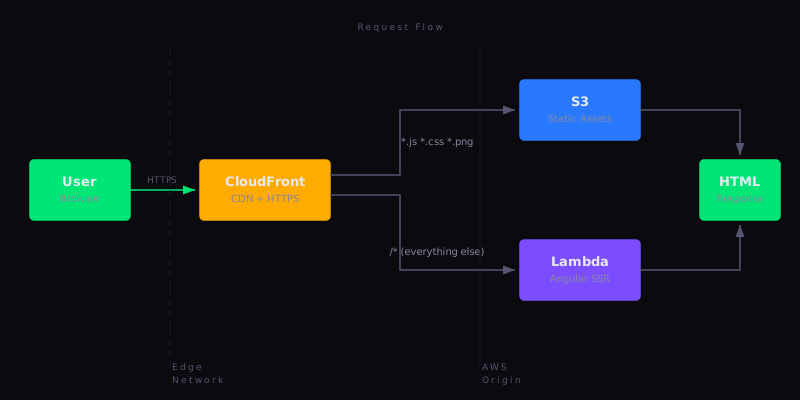
The system has two paths for serving content. Static assets, including JavaScript bundles, CSS, images, and fonts, are served directly from S3 via CloudFront. Everything else hits a Lambda function running the Angular SSR server.
This separation matters. Static assets are immutable after deployment: they have content hashes in their filenames and get cached for a year. The SSR responses are dynamic because they render the page on every request, which means the HTML always reflects the latest build. CloudFront sits in front of both, handling HTTPS termination and edge caching.
The philosophy here is separation of concerns applied to infrastructure. The same principle that says "don't put business logic in your controller" also says "don't serve static files through your application server." Each component does one thing well.
Lambda Web Adapter is what makes the serverless SSR work. It's an AWS-provided layer that wraps any HTTP server (Express, Fastify, or whatever) and handles the Lambda invocation lifecycle. From the application's perspective, it's simply a normal Express server listening on port 8080. The adapter translates between Lambda's event model and HTTP. This is a good abstraction because the application code doesn't know or care that it's running on Lambda.
The Pipeline: Systems Should Maintain Themselves
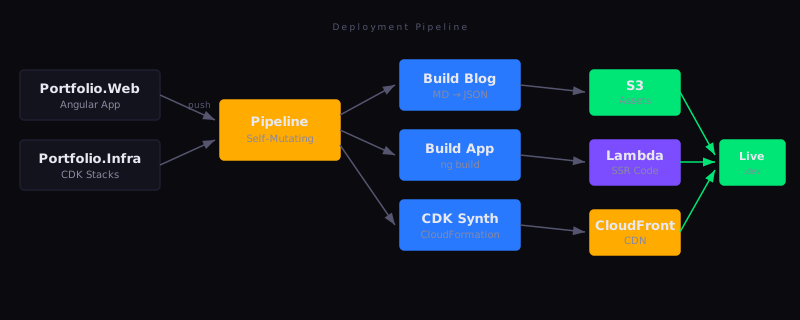
The deployment pipeline is self-mutating. If I change the pipeline definition itself, for example adding a build step or modifying the deployment order, it updates itself before deploying the application. The only manual cdk deploy I ever ran was the initial bootstrap.
This is a principle I care about deeply: a system should be capable of maintaining itself. If deploying a change to your deployment process requires a manual process, you've created a recursive problem. CDK Pipelines solves this elegantly because the pipeline is simply another piece of infrastructure defined in code.
The pipeline watches two repositories: the infrastructure repo (CDK stacks) and the web app repo (Angular). A push to either triggers a full build and deploy. The synth step builds the Angular app, generates the blog content from markdown, synthesises the CloudFormation templates, and the pipeline takes it from there.
There's a broader philosophy here about infrastructure as code that goes beyond version control. When your infrastructure is code, it's reviewable, testable, and reproducible. If I deleted every AWS resource tomorrow, a single cdk deploy would recreate the entire stack identically. That's not just convenient. It means the infrastructure is documented by its own existence. There is no wiki page that is three months out of date describing what's deployed where.
Domain-Driven Thinking Beyond the Backend
The project structure follows domain-driven design principles, even though it's a frontend application. The codebase is organised around business concepts such as features/hero, features/experience, and features/skills, not technical layers like components/, services/, or pages/.
This matters more than it might seem. When I need to change how the experience section works, I go to features/experience/ and everything I need is there. I'm not hunting across five different folders to find the component, its service, its model, and its tests. The code is organised around what it does, not what it is.
The same principle applies to the infrastructure. Each CDK stack has a single responsibility. DnsStack manages the hosted zone. CertificateStack handles TLS. WebStack composes the application layer. They depend on each other explicitly through typed props rather than through hardcoded ARNs or naming conventions.
This is how I structure all the systems I work on. The domain drives the architecture, which means there are clear boundaries. When the requirements change (and they always do), the boundaries tell you exactly where the change needs to happen.
The Bug That Tested Everything
After the first successful deployment, the site returned a 400 Bad Request:
URL with hostname "xxx.lambda-url.eu-west-2.on.aws" is not allowed.
Angular 21.2.2 had introduced SSRF protection as part of a CVE fix. The AngularNodeAppEngine validates the Host header against an allowlist, and the Lambda function URL hostname wasn't on it.
This is where debugging philosophy matters. The temptation with a cryptic error is to start changing things at random, adding an environment variable here or trying a different config format there. I've watched teams burn hours this way. The disciplined approach is to understand the system before you try to fix it.
So I traced the request path. CloudFront receives the request with Host: davidshortland.dev. It forwards it to the Lambda function URL but replaces the Host header with the Lambda URL hostname. This is standard CloudFront behaviour for function URL origins. Lambda Web Adapter passes this to Express, which passes it to Angular's SSR engine. Angular checks the Host header against its allowlist. The Lambda hostname is not there. Result: 400.
Once you understand the flow, the fix becomes obvious: tell Angular about the Lambda hostname. However, the implementation of that fix had its own subtlety.
I tried three approaches that didn't work:
Setting NG_ALLOWED_HOSTS as a Lambda environment variable.
This seemed like the right approach because it is documented. However, Angular 21.2.2 reads this at build time and bakes it into the SSR manifest. A runtime environment variable is too late.
Passing allowedHosts in the AngularNodeAppEngine constructor.
The API accepts it, but the build-time manifest takes precedence. The constructor options are additive rather than overriding, and the manifest was empty.
Using dot-prefix patterns in angular.json.
Close, but incorrect syntax. Angular uses *.example.com wildcard notation, not .example.com.
The fix was the allowedHosts array in angular.json under security, using wildcard patterns:
{
  "security": {
    "allowedHosts": [
      "localhost",
      "davidshortland.dev",
      "www.davidshortland.dev",
      "*.lambda-url.eu-west-2.on.aws",
      "*.cloudfront.net"
    ]
  }
}
The key insight: this configuration is baked into the build output. It is not a runtime setting. Each failed attempt required a full pipeline cycle to test: push, build, deploy, check. This is where the self-mutating pipeline proved useful, since at least I did not have to manually deploy each attempt.
The lesson is not about Angular configuration. It is about the value of tracing a problem through the entire system before reaching for solutions. Understand first, then fix.
The Cold Start Tradeoff
Lambda functions have cold starts. The first request after a period of inactivity takes longer because AWS needs to initialise the runtime. For this site, a cold start adds roughly 2 to 3 seconds to the first request.
I'm comfortable with this tradeoff, and here's why: optimise for the common case, not the edge case.
The common case for a portfolio site is that nobody is visiting. I would rather pay zero pounds during those idle hours and accept a slightly slower first load than run a t3.micro 24/7 for instant responses to traffic that does not exist. Once the function is warm, subsequent requests are fast, typically 100 to 200 ms for a full SSR render.
If this were a high-traffic application, the calculus would be different. Provisioned concurrency or a container-based deployment would make more sense. Applying high-traffic patterns to a low-traffic site is a common mistake. It is over-engineering: spending complexity on a problem you do not actually have.
This connects to a broader principle: every architectural decision has a context. There is no universally correct answer to "should I use serverless?" The answer is always conditional, depending on what you are building, for whom, and under what constraints. Developers who insist that one approach is always right are usually the ones who have not worked across enough different problems.
Iterative Delivery Over Big Bang Releases
The site was not built in one go. It was deployed to production within hours of starting, initially just a working SSR page with the basic structure. Features were added incrementally: the telemetry gauge animations, the blog system, security headers, analytics. Each change was a small, deployable unit.
It is agile as a mindset. The pipeline enables it because pushing a small change to production takes minutes rather than hours. When the cost of deployment is near zero, you naturally gravitate toward smaller, more frequent changes. When deployment is painful, you batch changes together, which increases risk and makes debugging harder.
The Stack
For anyone building something similar:
- Angular 21 with
@angular/ssrandoutputMode: server - Express 5 via
AngularNodeAppEngine - Lambda Web Adapter layer (ARM64), which wraps Express as a Lambda function
- CloudFront with dual origins: S3 for static assets, Lambda Function URL for SSR
- CDK with a self-mutating CodePipeline watching two repositories
- TailwindCSS v4 via
@tailwindcss/postcss(Angular's built-in support does not fully handle v4 syntax) - Blog system built from markdown files processed at build time into bundled JSON
The total infrastructure cost for a low-traffic site is effectively zero, comfortably within the AWS free tier.
More important than the specific tools, though, is understanding why you are choosing each one. If you cannot articulate the principle behind a decision, you probably have not made the decision yet. You have simply defaulted to something familiar. Familiar is not always the right choice.