Building WeatherWise: A Weather Platform That Tells You What to Do
Building a weather platform that transforms raw API data into prioritised, actionable recommendations, and the full-stack architecture that supports it.
Every weather app shows you the same thing: temperature, humidity, wind speed, a little cloud icon. You look at the number, you decide what it means for your day, you close the app. The interpretation is your problem.
For the Advanced Web Development module at UEA, I built WeatherWise: a weather platform that does the interpretation for you. Instead of showing "UV index: 9" and leaving you to figure out what that means, it tells you to wear SPF 50+, stay out of direct sun between 10 and 4, and bring a hat. Instead of "wind: 45 km/h," it tells you to secure outdoor furniture and drive carefully.
The project scored 95%. I think the reason is that the interesting engineering is not in fetching weather data (that is just an API call) but in what happens between the data arriving and the user seeing it.
The Insight Engine
The core of the application is a rule-based recommendations system that evaluates raw weather data against a set of conditions and produces prioritised, actionable insights.
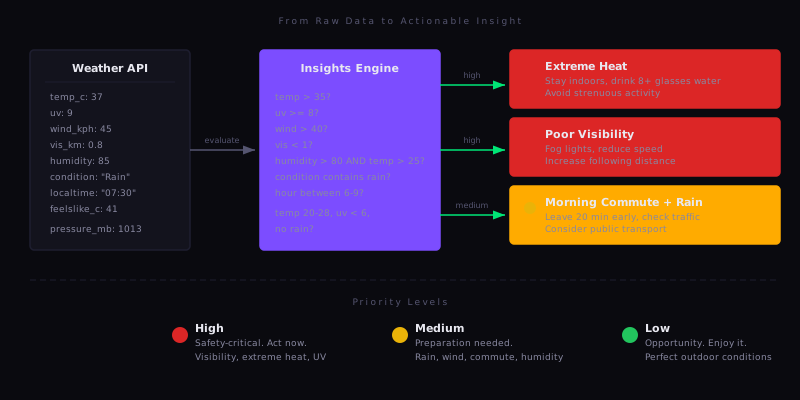
Each insight has a category (safety, health, travel, activity), a priority level (high, medium, low), a description of the condition, and an action: the specific thing the user should do.
The rules are layered by severity:
High priority covers safety-critical conditions. Visibility below 1 km triggers fog driving advice. Temperature above 35 degrees triggers heat warnings with hydration targets. UV index 8 or above triggers specific sunscreen SPF recommendations and time windows to avoid.
Medium priority covers preparation. Rain in the forecast triggers umbrella and waterproof advice. But the engine also checks the time of day: if it is raining between 6 and 9 AM, it adds a commute-specific recommendation (leave 20 minutes early, check traffic apps, consider public transport). High humidity combined with high temperature triggers hydration alerts that would not fire for either condition alone.
Low priority captures opportunities. If the temperature is between 20 and 28 degrees, UV is below 6, and there is no rain, the system suggests outdoor activities. This only fires when none of the higher-priority conditions are active.
interface Insight {
  category: 'clothing' | 'activity' | 'travel' | 'health' | 'business' | 'safety';
  priority: 'high' | 'medium' | 'low';
  icon: React.ReactNode;
  title: string;
  description: string;
  action: string;
}
The insights are sorted by priority before rendering. High-priority items appear first with red indicators. Medium items are amber. Low items are green. If no conditions trigger, the component shows a positive "all clear" message instead of an empty state.
What makes this more than a series of if-statements is the compositional nature of the rules. The commute recommendation does not just check for rain. It checks for rain and a specific time window. The humidity alert does not just check humidity. It checks humidity and temperature, because 85% humidity at 15 degrees is not a health concern, but 85% humidity at 30 degrees is. The rules encode domain knowledge about when weather conditions actually matter to a person's day.
The Stack
This project uses a different stack from everything else in my portfolio, which was part of the point. The work projects and other university work are Angular. WeatherWise is Next.js 15 with React 19, PostgreSQL with Drizzle ORM, and Zustand for state management.
Next.js gave me the App Router for file-based routing with server components, API routes co-located with the pages that use them, and middleware for authentication guards. Drizzle gave me type-safe database queries that infer their types from the schema definition, so the TypeScript compiler catches query errors at build time rather than runtime. Zustand gave me a lightweight store without the boilerplate of Redux.
The combination means the type safety runs from the database schema through the API routes to the React components. A change to the schema propagates as compiler errors everywhere that data is used.
Authentication: No Passwords
WeatherWise uses Google OAuth exclusively. There is no registration form, no password field, no forgot-password flow. Users click "Continue with Google" and they are in.
This was a deliberate design decision, not a shortcut. Password authentication means storing hashed passwords, building reset flows, handling rate limiting, dealing with weak passwords, and accepting liability for credential storage. OAuth delegates all of that to Google. The database stores a user's name, email, and profile image. No secrets.
The NextAuth callback chain handles user creation automatically:
async signIn({ user, account, profile }) {
    const existingUser = await db.select().from(users)
        .where(eq(users.email, user.email));

    if (existingUser.length === 0) {
        await db.insert(users).values({
            name: user.name,
            email: user.email,
            image: user.image,
            preferences: { temperatureUnit: 'celsius', windUnit: 'kmh' }
        });
    } else {
        await db.update(users)
            .set({ name: user.name, image: user.image, updatedAt: new Date() })
            .where(eq(users.email, user.email));
    }
    return true;
}
First sign-in creates the user with sensible defaults. Subsequent sign-ins update the profile image and name (in case the user changed them on Google's side). The JWT session lasts 30 days. The schema evolved through three migrations to reach this design: the first version had a password field, the second added OAuth, the third removed passwords entirely.
State Management and Caching
The Zustand store manages the weather data cache, user preferences, saved locations, and loading state. The interesting part is how it handles multiple locations.
The dashboard loads weather for up to four saved locations in parallel:
const weatherPromises = locations.map(async (location) => ({
    locationId: location.id,
    weather: await fetch(`/api/weather/current?location=${lat},${lon}`).then(r => r.json())
}));

const results = await Promise.all(weatherPromises);
Each result is stored in a locationWeatherCache object keyed by location ID. When the user removes a location, its cached weather is pruned:
removeLocation: (locationId) => set((state) => ({
    locations: state.locations.filter(loc => loc.id !== locationId),
    locationWeatherCache: Object.fromEntries(
        Object.entries(state.locationWeatherCache)
            .filter(([key]) => key !== locationId)
    )
}));
The store also handles unit conversion. Rather than converting units at the component level (which scatters conversion logic across the codebase), the store provides helper methods:
getTemperatureInUnit: (tempC, tempF) => {
    return get().preferences.temperatureUnit === 'celsius' ? tempC : tempF;
}
Components call the helper. The preference propagates from one place. If I added a Kelvin option tomorrow, only the store would need to change.
Location Comparison
The comparison feature lets users place up to four saved locations side by side. Each location loads its weather in parallel, and the UI highlights the best and worst values for each metric.
The highlighting logic is context-aware. For temperature, higher is not necessarily better or worse, so it is left neutral. For UV and wind, lower is better. For visibility, higher is better. The system determines best and worst per metric and only applies colour highlighting when three or more locations are compared (with two, it is obvious).
This feature reuses the same weather API calls and Zustand cache as the dashboard. A location that was already loaded on the dashboard does not need to be fetched again. The comparison just reads from the store.
Geolocation and Fallbacks
When the dashboard loads, it requests the browser's geolocation with a 5-second timeout:
navigator.geolocation.getCurrentPosition(
    (position) => {
        const { latitude, longitude } = position.coords;
        if (savedLocations.length === 0) {
            loadWeatherForLocation(latitude, longitude);
        }
    },
    (error) => {
        if (savedLocations.length === 0) {
            loadWeatherForLocation(51.5074, -0.1278); // London fallback
        }
    },
    { enableHighAccuracy: false, timeout: 5000, maximumAge: 0 }
);
The fallback strategy has two layers. If the user has saved locations, those take priority over geolocation entirely, since the user has already told the system what they care about. If they have no saved locations and geolocation fails (permissions denied, timeout, or unavailable), it falls back to London. The user always sees weather data, never an empty screen.
Locations are stored and queried by latitude and longitude rather than city name. This avoids ambiguity ("Portland" could be Oregon or Maine) and gives precise results from the weather API.
The Data Model
The database has two tables. Users store authentication data and preferences as a JSON column:
export const users = pgTable('users', {
    id: uuid('id').defaultRandom().primaryKey(),
    name: varchar('name', { length: 255 }),
    email: varchar('email', { length: 255 }).unique().notNull(),
    image: text('image'),
    preferences: json('preferences').$type<{
        temperatureUnit: 'celsius' | 'fahrenheit';
        windUnit: 'mph' | 'kmh';
    }>().default({ temperatureUnit: 'celsius', windUnit: 'kmh' }),
    createdAt: timestamp('created_at').defaultNow(),
    updatedAt: timestamp('updated_at').defaultNow()
});
Locations use decimal precision to seven places (roughly 1 centimetre accuracy) and cascade-delete with their user:
export const locations = pgTable('locations', {
    id: uuid('id').defaultRandom().primaryKey(),
    userId: uuid('user_id').references(() => users.id, { onDelete: 'cascade' }).notNull(),
    name: varchar('name', { length: 255 }).notNull(),
    latitude: numeric('latitude', { precision: 10, scale: 7 }).notNull(),
    longitude: numeric('longitude', { precision: 10, scale: 7 }).notNull(),
    isDefault: boolean('is_default').default(false),
    createdAt: timestamp('created_at').defaultNow()
});
Preferences live in a JSON column rather than separate columns because they are always read and written as a unit. Adding a new preference (say, a pressure unit) means updating the TypeScript type and the default value. No migration needed.
API inputs are validated with Zod schemas at the route boundary. The preferences endpoint, for example, rejects anything that is not a valid unit combination:
const preferencesSchema = z.object({
    temperatureUnit: z.enum(['celsius', 'fahrenheit']),
    windUnit: z.enum(['mph', 'kmh'])
});
Invalid input gets a 400 before it reaches the database. Valid input is type-safe from that point forward.
The Takeaway
The weather data is free. WeatherAPI.com gives you temperature, wind, UV, humidity, visibility, pressure, forecasts, and alerts. Any developer can display that data in a grid.
The value is in the layer between the data and the user. The insight engine is only about 200 lines of code, but it is the reason the app is useful rather than just functional. It encodes the domain knowledge that most weather apps leave to the user: what UV 9 actually means for your skin, what 0.8 km visibility means for your drive, what rain at 7 AM means for your commute.
That pattern applies beyond weather apps. In most systems, the raw data is the easy part. The hard part is deciding what the data means for the person looking at it. The engineering that matters most is often not in the infrastructure or the framework. It is in the thin layer of logic that turns information into something someone can act on.